This section shows ways use Flashback techniques to query past data using UNDO.
Flashback Query TOP
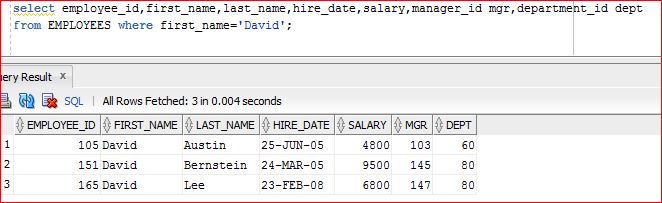
Here is our initial data.
Now let's delete a record
delete from EMPLOYEES where first_name='David' and last_name='Lee';
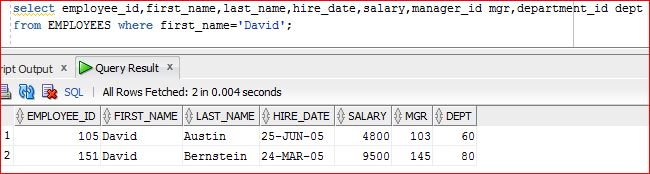
Querying again will show only 2 records.
Now using flashback query feature.
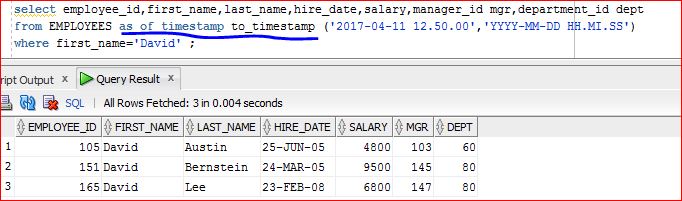
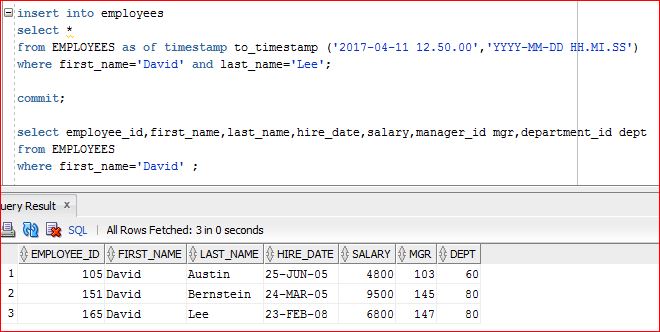
Using this flashback query feature, we can now re-insert the deleted data.
Re-querying shows that deleted data is back now.
Same functionality can be achieved through DBMS_FLASHBACK package also.
Its useful when the existing PL/SQL code cannot be touched.
Current number of such employees is 3 as can be seen:
	select count(*) from EMPLOYEES where first_name='David' ;
	COUNT(*)
	--------
	3
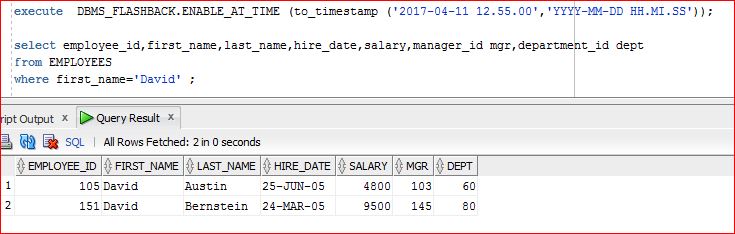
Now let us set flashback to the time when the employee was in deleted state.
Re-query shows the count as 2.
	execute  DBMS_FLASHBACK.ENABLE_AT_TIME (to_timestamp ('2017-04-11 12.55.00','YYYY-MM-DD HH.MI.SS'));

	select count(*) from EMPLOYEES where first_name='David' ;
	COUNT(*)
	--------
	2
Querying data shows 2 records:
Disabling the flashback brings us back to present:
	execute  DBMS_FLASHBACK.DISABLE;

	select count(*) from EMPLOYEES where first_name='David' ;
	COUNT(*)
	--------
	3
Flashback Versions Query TOP
Flashback versions query is used to see the past versions of a table row, between either two points in time or two SCNs, for the purpose of audit to know what all changes happened for the given row OR to undo the incorrect data changes.
With each COMMIT, a new version is created. If a row ins inserted and then updated and then deleted, the table will NOT contain that row but via flashback versions query we can know what all happened to that row in the past beween two time intervals or SCNs.
Some pseudo-columns involved in this operation are:
1) VERSIONS_STARTSCN and VERSIONS_STARTTIME: These pseudo-columns tell you the SCN and time stamp when this particular row was first created. If the VERSIONS_STARTTIME is null, the row was created before the lower time boundary of the query.
2) VERSIONS_ENDSCN and VERSIONS_ENDTIME: These pseudo-columns tell you when this particular row expired. If the VERSIONS_ENDTIME column value is null, it means that the row is either current or that it has been deleted.
3) VERSIONS_OPERATION: Tells the type of DML activity that was performed on the particular row. The column has three possible values: I - insert, D - delete, and U - update operation.
4) VERSIONS_XID: This pseudo-column displays the unique transaction identifier of the transaction that resulted in this row version.
Lets see an example to understand it better:
	Insert a new row in EMPLOYEES table:

	Insert into EMPLOYEES (EMPLOYEE_ID,FIRST_NAME,LAST_NAME,EMAIL,PHONE_NUMBER,HIRE_DATE,JOB_ID,SALARY,COMMISSION_PCT,MANAGER_ID,DEPARTMENT_ID)
	values (99,'Mike','Salve','MSalve','515.123.1111',to_date('19-JUN-03','DD-MON-RR'),'AD_VP',24500,null,null,90);
	commit;

	select employee_id,first_name,last_name,salary  from employees where employee_id=99;

	EMPLOYEE_ID FIRST_NAME      LAST_NAME       SALARY
	----------- --------------- --------------- ----------
         99     Mike            Salve           24500

	Get Current SCN
	select dbms_flashback.get_system_change_number n from dual;
	n
	-----------------
	2382713

	We can see that only 1 version exists as of now, created via Insert operation:

	SELECT versions_xid AS XID, versions_startscn AS START_SCN,
	versions_endscn AS END_SCN,
	versions_operation AS OPERATION,
	employee_id,first_name,last_name,salary  FROM EMPLOYEES
	VERSIONS BETWEEN SCN MINVALUE AND MAXVALUE
	AS OF SCN 2382713
	WHERE employee_id = 99;

        XID              START_SCN    END_SCN 	OP 	EMPLOYEE_ID FIRST_NAME	LAST_NAME    SALARY
	--------------------------------------------------------------------------------------------
    050008007C080000     2382649      2382759    I    99          Mike        Salve        24500

	Lets update Salary and then delete the record.

	update employees set salary = 100 where employee_id=99;
	commit;
	delete from employees where employee_id=99;
	commit;

	Get Current SCN
	select dbms_flashback.get_system_change_number n from dual;
	n
	-----------------
	2382771

	Using versions query again:

	SELECT versions_xid AS XID, versions_startscn AS START_SCN,
	versions_endscn AS END_SCN,
	versions_operation AS OPERATION,
	employee_id,first_name,last_name,salary  FROM EMPLOYEES
	VERSIONS BETWEEN SCN MINVALUE AND MAXVALUE
	AS OF SCN 2382771
	WHERE employee_id = 99;

       XID              START_SCN    END_SCN 	OP 	EMPLOYEE_ID FIRST_NAME	LAST_NAME   SALARY
	---------------------------------------------------------------------------------------------
	07001B0076060000    2382767                 D	99          Mike        Salve       100
	0B00090029000000    2382759    2382767      U	99          Mike        Salve       100
	050008007C080000    2382649    2382759      I   99          Mike        Salve       24500

	This shows that the row was updated with salary as 100 and then it was deleted.

	So we now know what all operations were done with employee id 99.
	END_SCN being null in topmost row means that the row is deleted (or current).
Flashback Transaction Query TOP
In-progress............Thanks...
TOP