This document aims at demonstrating the use of Oracle's built-in DBMS_APPLICATION_INFO package.
Environment used:
- Windows 7, 64 bit
- Oracle 11g R2
Introduction to DBMS_APPLICATION_INFO
DBMS_APPLICATION_INFO allows putting information in V$SESSION view (and V$SESSION_LONGOPS) and enables us to trace the session activities. It may also be used to check which part of code is currently executing and can be used to check even which record is getting processed at a given moment.
User must be granted EXECUTE privilege on DBMS_APPLICATION_INFO package before enabling usage.
Following important sub-programs are present in this package (please note few other sub-programs are also present but only important and widely used ones are mentioned here):
- DBMS_APPLICATION_INFO.SET_MODULE
- It sets the values in module and action columns in V$SESSION view.
It’s generally used only once to set the module and first action and afterwards DBMS_APPLICATION_INFO.SET_ACTION is used to set further actions.
Usage:
DBMS_APPLICATION_INFO.set_module (module_name => {module text} ,action_name => {action text}); - DBMS_APPLICATION_INFO.SET_ACTION
- It sets the value in action column in V$SESSION view.
Usage:
DBMS_APPLICATION_INFO.set_action (action_name => {action text}); - DBMS_APPLICATION_INFO.SET_CLIENT_INFO
- It sets the value in client_info column in V$SESSION view. It’s used to add extra info along with action.
Usage:
DBMS_APPLICATION_INFO.set_client_info (client_info => {client info text}); - DBMS_APPLICATION_INFO.READ_CLIENT_INFO
- It reads the last client_info value set by SET_CLIENT_INFO procedure
- DBMS_APPLICATION_INFO.READ_MODULE
- It reads the last action and module value set by SET_ACTION or SET_MODULE procedures.
Example 1
Below is a demonstration for the above mentioned info for better understanding.
--Give required Grants grant execute on DBMS_APPLICATION_INFO to; grant execute on DBMS_LOCK to ; dbms_lock.sleep has been used just to introduce some time gap so as to enable us to check the values appearing in V$SESSION view. --Get current session id (SID). Values in V$SESSION view will be checked for this SID. select distinct sid from v$mystat; --Create a dummy table create table t_tab (x VARCHAR(30)); --Anonymous block utilizing DBMS_APPLICATION_INFO BEGIN --Set module and initial action DBMS_APPLICATION_INFO.set_module (module_name ='Working on t_tab' , action_name =>'INSERTING and UPDATING!'); dbms_lock.sleep (5); --Set particular action DBMS_APPLICATION_INFO.set_action (action_name ='INSERTING now!'); for i in 1..5 loop insert into t_tab (X) values ('Sequence#'|| to_char(i)); dbms_lock.sleep (1); end loop; --Set action again as it changed DBMS_APPLICATION_INFO.set_action (action_name ='UPDAING now!'); --Set client_info as supplement to action DBMS_APPLICATION_INFO.set_client_info(client_info = ‘Column will be updated to NULL'); dbms_lock.sleep (5); UPDATE t_tab SET x = NULL ; dbms_lock.sleep (5); --Set the values to NULL so that future transactions may not get mistaken by already set values if --they don't set their own values. DBMS_APPLICATION_INFO.set_module (module_name =NULL ,action_name =NULL); DBMS_APPLICATION_INFO.set_client_info(client_info = NULL); Rollback; END;
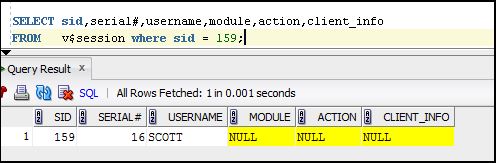
Below are shown, with the help of screenshots, the values appearing/changing in V$SESSION view for respective package sub-program.
DBMS_APPLICATION_INFO.set_module (module_name =>'Working on t_tab' ,action_name =>'INSERTING and UPDATING!');DBMS_APPLICATION_INFO.set_action (action_name =>'INSERTING now!');
DBMS_APPLICATION_INFO.set_action (action_name =>'UPDAING now!'); DBMS_APPLICATION_INFO.set_client_info(client_info => ‘Column will be updated to NULL');
DBMS_APPLICATION_INFO.set_module (module_name =>NULL ,action_name =>NULL); DBMS_APPLICATION_INFO.set_client_info(client_info => NULL);
Example 2
Another very important use of this package is to know which record is currently being processed in a loop operation.
--Create a dummy table
create table t_tab2 (x VARCHAR(30));
--Anonymous block utilizing DBMS_APPLICATION_INFO
BEGIN
	 --Set moule and initial action
	DBMS_APPLICATION_INFO.set_module (module_name =>'Working on t_tab2' ,  action_name =>'INSERTING !');
	 for i in 1..500000 loop
		--Set action. Note the changing variable.
		DBMS_APPLICATION_INFO.set_action ('Curently inserting record# '|| to_char(i));
		insert into t_tab (X) values ('Sequence#'|| to_char(i));
	end loop;

	ROLLBACK;
END ;
Below are shown, with the help of screenshots, the variable value getting changed showing which record is being processed at given moment.
Note the changing record number. This cannot be tracked using DBMS_OUTPUT.PUT_LINE in real time as output in that case appears only when processing of the block has finished.
Thanks...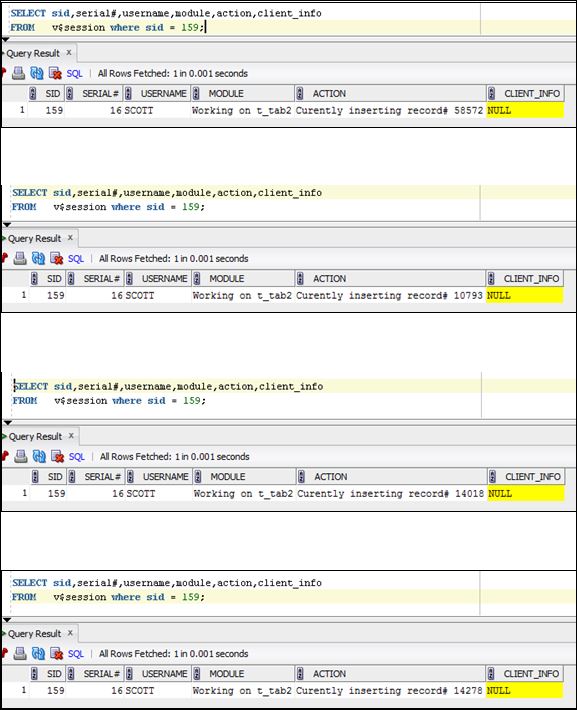
TOP